Security

Alarm

At 24HRS Network, we don’t just install alarm systems — we design smart, scalable security solutions tailored to your business. Whether you need a fast, off-the-shelf system with motion detectors, door sensors, and glass-break alerts, or a custom-built, fully networked solution with biometrics, floor pressure sensors, or laser-based intrusion detection — we deliver.

We specialize in hybrid solutions, helping large businesses across Texas integrate new technology with existing infrastructure for a unified, efficient system. Our expertise goes beyond security — we’ve even developed alarm systems integrated with time-clocks for employee tracking, meeting both safety and operational needs.

Access Control

At 24HRS Network, our mission is to empower businesses to focus on what they do best—while we handle the technology. We partner with our clients to drive productivity and growth by turning IT from a task on the to-do list into a strategic advantage. Our business-first approach means we don’t just support your technology—we align it with your goals to create real value and measurable results.

24HRS Network specializes in custom in-house fabrication and installation of entry gates for apartment communities and residential neighborhoods. We offer complete access control solutions, including telephone entry system, EZ TAG, and TxTag system integration—delivering security, convenience, and seamless entry for residents and guests.

TX LIC B18239

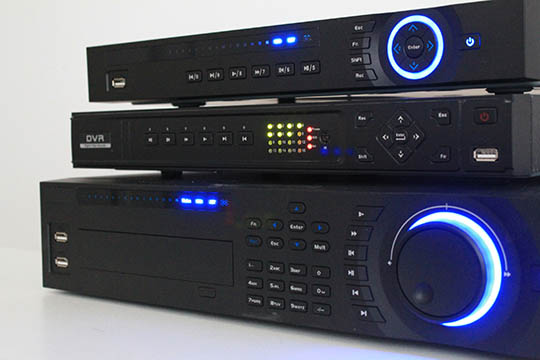
NVR / VMS / DVR Solutions

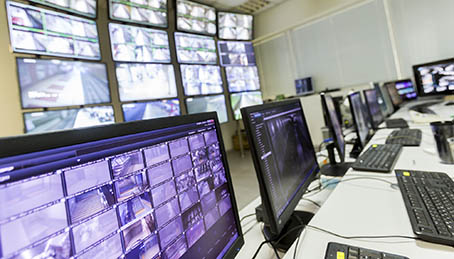
We understand—and fully agree—that no two businesses have the same security needs. That’s why we offer flexible video surveillance solutions designed to fit your unique environment. At the core of every system is a Network Video Recorder (NVR), which detects motion and securely stores video footage. Paired with a powerful Video Management System (VMS), your footage becomes instantly accessible and easy to navigate—whether you're on a desktop or checking in from a mobile device.

At 24HRS Network, we collaborate closely with you to design a high-quality surveillance system that meets your current requirements—while leaving room for future expansion. Whether you're a single-location business, a financial institution with strict compliance standards, or a large residential community needing wide-area coverage with night-vision cameras, we've got you covered. Our solutions scale seamlessly, from compact setups to multi-site installations spanning miles.

From basic monitoring to advanced analytics, we make it simple to keep an eye on what matters most.

Alarm Monitoring

24HRS Network is proud to partner with one of the nation’s largest and most trusted commercial alarm monitoring providers. As a licensed installer and certified partner, we’re able to offer our customers exclusive, lifelong monitoring discounts when we install their systems.

From basic entry monitoring to advanced business automation and full video surveillance, we deliver around-the-clock protection tailored to your needs — 24/7/365.

CyberSecurity

Secure, Scalable IT Solutions for the Modern Business

The internet is essential to business success — enabling access to larger markets, streamlining operations, and supporting critical tools like email, Microsoft® SharePoint, and VoIP phone systems. Without it, your business risks falling behind in both productivity and connectivity.

24HRS Network helps businesses stay secure and compliant in this digital landscape. We provide comprehensive security solutions including best-practices assessments, full-scale audits, employee security training, and ongoing compliance monitoring. For larger organizations, we provide end-to-end disaster recovery and business continuity solutions — from strategic planning to full implementation. Our team collaborates directly with your compliance officers to create and execute a tailored security and continuity plan, complete with management-level reporting and oversight.

CyberSecurity Tips

  • 1. Empower Your Team with Strong Security Training
  • 2. Protect information, computers and networks from cyber attacks
  • 3. Provide firewall security for your Internet connection
  • 4. Create a mobile device action plan
  • 5. Make backup copies of important business data and information
  • 6. Control physical access to your computers and create user accounts for each employee
  • 7. Secure your Wi-Fi networks
  • 8. Employ best practices on payment cards
  • 9. Limit employee access to data and information, limit authority to install software
  • 10. Passwords and authentication
Protect your business from within by training employees in essential cybersecurity principles. Implement clear policies on password strength, responsible internet use, and data protection practices. Set expectations with well-defined rules for handling customer data and sensitive company information—because security starts with your team.
Keep Machines Clean: Ensure all devices have the latest security software, web browsers, and operating systems. These updates provide critical defenses against viruses, malware, and other online threats. Configure antivirus software to automatically scan your system after each update, and install all other essential updates promptly when they become available.
A firewall is a security system—that helps prevent unauthorized access to your private network. Ensure that your operating system’s built-in firewall is enabled. For remote employees, verify that their home networks are also protected by active firewall security to maintain safe connections to company resources.
Mobile devices pose unique security and management risks, particularly when they store sensitive data or access the corporate network. Require all users to password-protect their devices, enable data encryption, and install reputable security apps to safeguard against threats—especially when using public Wi-Fi networks. Establish clear procedures for promptly reporting lost or stolen devices to minimize potential data breaches.
Regularly backup all important business data, including documents, spreadsheets, databases, financial records, HR files, and accounts receivable/payable information. Whenever possible, automate backups to run daily or at least weekly. Store backup copies securely offsite or in a trusted cloud storage solution to ensure quick recovery in case of data loss or system failure.
Protect business computers and devices from unauthorized use. Laptops are especially vulnerable to theft or loss, so always secure them when unattended. Ensure each employee has a unique user account with a strong password. Limit administrative privileges to trusted IT staff and key personnel only, reducing the risk of accidental or malicious system changes.
If your workplace uses a Wi-Fi network, ensure it is secure, encrypted, and hidden. Configure your wireless router or access point not to broadcast the network name (SSID) to reduce visibility to outsiders. Always use strong encryption and set a strong, unique password for router access to prevent unauthorized users from gaining entry.
Collaborate with your bank or payment processor to ensure you’re using the most trusted, validated tools and anti-fraud services available. Be aware of any additional security requirements outlined in your agreements with these partners. Always isolate payment systems from general-use programs—never use the same computer for both processing payments and browsing the internet to minimize exposure to threats.
No single employee should have unrestricted access to all data systems. Grant access based strictly on job responsibilities—employees should only have permissions necessary for their roles. Additionally, restrict the ability to install software without prior authorization to reduce the risk of introducing malware or unapproved applications.
Ensure employees use unique, complex passwords and require them to be changed at least every three months. Strengthen account security by implementing multi-factor authentication, which requires an additional verification step beyond just a password. For accounts managed by third-party vendors—especially those involving sensitive or financial data—confirm that multi-factor authentication is available and enabled.